Sunday, June 12, 2016

MCP2221 Tutorial - USB interfacing made easy

What is MCP2221?
MCP2221 is a USB to UART and I2C bridge IC from Microchip technologies, plus the bridge capability this chip has the following features:
4 GPIO pins, three of them can be configured to become a 10-bits Analog to Digital Converter (ADC) of a 1 KSps sampling rate, also two of these GPIO pins are multiplexed with a 5-bits Digital to Analog Converter (DAC).

Why MCP2221?
This MCP2221 is a simple and inexpensive computer/USB interface solution for computer control applications, with a very few component peripherals you can get it up and running, just a capacitor and pull-up resistor on the reset pin. It can be either bus-powered or self-powered, and it is available in PDIP package which makes it easy to prototype on a breadboard or prototyping PCB.

Development and application tools for the MCP2221:
The chip web page indicates that drivers for Windows OS, Linux, and Mac OS are available, plus a DLL library for C/C++ and .Net under Windows OS environment, other tools include Command Line Interface (CLI) and GUI-based Windows applications to control the MCP2221 I/O’s without the need to develop your own application, for more information check the IC datasheet on Microchip Technologies website here.

MCP2221 Driver:
The MCP2221 is a composite device, i.e. the device supports both HID and CDC classes, the CDC class supports the USB to UART bridge functionality and the HID class the support the USB to I2C bridge, GPIO, ADC and DAC features.  

Circuitry and connection:
VDD and VSS pins (1 and 14) are the IC power supply and ground pins respectively, pull-up (connect to VDD) the reset pin (pin 4) with a resistor (anything between 330 Ohm and 4.7 Kilo Ohms), and a 470 nF ceramic capacitor between VUSB pin (pin 11) and ground.

MCP2221 Circuit


Example applications:
DC and stepper motors control, simple monitoring applications, data input devices, interface to microcontrollers and other embedded processors, LED control.

Example code:

  1
  2
  3
  4
  5
  6
  7
  8
  9
 10
 11
 12
 13
 14
 15
 16
 17
 18
 19
 20
 21
 22
 23
 24
 25
 26
 27
 28
 29
 30
 31
 32
 33
 34
 35
 36
 37
 38
 39
 40
 41
 42
 43
 44
 45
 46
 47
 48
 49
 50
 51
 52
 53
 54
 55
 56
 57
 58
 59
 60
 61
 62
 63
 64
 65
 66
 67
 68
 69
 70
 71
 72
 73
 74
 75
 76
 77
 78
 79
 80
 81
 82
 83
 84
 85
 86
 87
 88
 89
 90
 91
 92
 93
 94
 95
 96
 97
 98
 99
100
101
102
103
104
105
106
107
108
109
110
111
112
113
114
115
116
117
118
119
120
121
122
123
124
125
126
127
128
129
130
131
132
133
134
#include <stdio.h>
#include <conio.h>
#include <Windows.h>
#include "mcp2221_dll_um.h"

#pragma comment(lib, "mcp2221_dll_um_x86.lib")  //Link MCP2221 library, applicable for visual studio only

//Global variables
void *handle;

void ExitFunc()
{
 printf("Closing\n");
 _sleep(10);
 //Mcp2221_Reset(handle);
 
 //Close all devices at exit
 Mcp2221_CloseAll();
}
int main()
{
 wchar_t LibVer[6];
 wchar_t MfrDescriptor[30];
 wchar_t ProdDescrip[30];
 int ver = 0; 
 int error = 0;
 int flag = 0;
 unsigned char pinFunc[4] = {MCP2221_GPFUNC_IO, MCP2221_GPFUNC_IO, MCP2221_GP_DAC, MCP2221_GPFUNC_IO};  //Set GP0, GP1, GP3 as digital IO and GP2 as DAC
 unsigned char pinDir[4] = {MCP2221_GPDIR_OUTPUT, MCP2221_GPDIR_OUTPUT, NO_CHANGE, MCP2221_GPDIR_OUTPUT};  //configure GP0, GP1, GP3 as digital output
 unsigned char OutValues[4] = {0, 0, NO_CHANGE, 0};   //set initial values to 0's
 unsigned char PowerAttrib;
 unsigned char DacVal = 31;
 unsigned char DacRefValue = 0;
 unsigned int ReqCurrent;
 unsigned int PID = 0xDD;
 unsigned int VID = 0x4D8;
 unsigned int NumOfDev = 0;

 atexit(ExitFunc); //Call exit function

 ver = Mcp2221_GetLibraryVersion(LibVer);  //Get DLL version
 if(ver == 0)
  printf("Library (DLL) version: %ls\n", LibVer);
 else
 {
  error = Mcp2221_GetLastError();
  printf("Version can't be found, version: %d, error: %d\n", ver, error);
 }

 //Get number of connected devices with this VID & PID
 Mcp2221_GetConnectedDevices(VID, PID, &NumOfDev);
 if(NumOfDev == 0)
 {
  printf("No MCP2221 devices connected\n");
  exit(0);
 }
 else
  printf("Number of devices found: %d\n", NumOfDev);   

 //Open first MCP2221 device discovered by index
 handle = Mcp2221_OpenByIndex(VID, PID, NumOfDev-1); 
 error = Mcp2221_GetLastError();
 if(error == NULL)
  printf("Connection successful\n");
 else
  printf("Error message is %s\n", error);

 //Get manufacturer descriptor
 flag = Mcp2221_GetManufacturerDescriptor(handle, MfrDescriptor);
 if(flag == 0)
  printf("Manufacturer descriptor: %ls\n", MfrDescriptor);
 else
  printf("Error getting descriptor: %d\n", flag);

 //Get product descriptor
 flag = Mcp2221_GetProductDescriptor(handle, ProdDescrip);
 if(flag == 0)
  printf("Product descriptor: %ls\n", ProdDescrip);
 else
  printf("Error getting product descriptor: %d\n", flag);
  
 //Get power attributes
 flag = Mcp2221_GetUsbPowerAttributes(handle, &PowerAttrib, &ReqCurrent);
 if(flag == 0)
  printf("Power Attributes, %x\nRequested current units = %d\nRequested current(mA) = %d\n", PowerAttrib, ReqCurrent, ReqCurrent*2);
 else
  printf("Error getting power attributes: %d\n", flag);

 //Set GPIO
 flag = Mcp2221_SetGpioSettings(handle, RUNTIME_SETTINGS, pinFunc, pinDir, OutValues);
 if(flag != 0)
 {
  printf("Error setting GPIO, error: %d\n", flag);
  system("pause");
 }
 Mcp2221_SetGpioValues(handle, OutValues); //reset all pins at initialization

 //Set DAC reference to VDD
 flag = Mcp2221_SetDacVref(handle, RUNTIME_SETTINGS, VREF_VDD);
 
 if(flag != 0)
 {
  printf("Error setting DAC reference, error: %d\n", flag);
  system("pause");
 }

 while(1)
 {
  //Set DAC value on GP2
  DacVal++;
  if(DacVal == 32)
   DacVal = 0;
  printf("DAC value is: %x\n", DacVal);
  flag = Mcp2221_SetDacValue(handle, RUNTIME_SETTINGS, DacVal);  //must use "RUNTIME_SETTINGS" to enable and output voltage to the DAC
  if(flag != 0)
  {
   printf("Error setting DAC, error: %d\n", flag);
   system("pause");
  }

  //Toggle GPIO pins: GP0, GP1, GP3 for 50mS
  OutValues[0] = MCP2221_GPVAL_HIGH;  //set GP0 (output high)
  OutValues[1] = MCP2221_GPVAL_LOW;   //reset GP1 (output low)
  OutValues[3] = MCP2221_GPVAL_LOW;   //reset GP3 (output low)
  Mcp2221_SetGpioValues(handle, OutValues);  //now set the DIO pins values
  _sleep(50);    //wait for 50mS
  OutValues[0] = MCP2221_GPVAL_LOW;    //reset GP0 (output low)
  OutValues[1] = MCP2221_GPVAL_HIGH;   //set GP1 (output high)
  OutValues[3] = MCP2221_GPVAL_HIGH;   //set GP3 (output high)
  Mcp2221_SetGpioValues(handle, OutValues);   //now set the DIO pins values
  _sleep(50);    //wait for 50mS
 }
 return 0;
}


Tuesday, March 29, 2016

Introduction to Rapid Prototyping: Robotics - Part 3: Robot's Brain

Going back to the human-being analogy, the human body is the most known closed-loop control system to us, it has sensors (human senses of touch, feel, vision, listen…etc), actuators (muscles, tendons, and joints) and finally a decision-making unit, an organ that analyzes and organize the information acquired from different sensors and command the actuators in act in a certain desired way. Robots are the imitation of the human being in all of its details, and without the analysis and decision-making unit the robot is incomplete and most probably will be dysfunctional and thus useless, so, this section is dedicated to the “Brain’s” of the robot to be built.
Microprocessors are the piece of electronics that will replace the brain for robots, they are made of tens or hundreds of millions of transistors all engraved on a silicon die. The personal computer we use every day consists of the microprocessor unit connected to many other peripherals for data processing, storage, input and output using hard-disk drives, RAM memory units, sound cards, keyboards and mice, they are quite efficient for the business and personal activities they are involved in, but when it comes to a small and/or mobile robot they aren’t the best because they are:
  •  Power hungry, personal computers consume a lot of power.
  •  Expensive, they can cost anything between 250$ and more.
  • Physical profile, they are big in size which makes them not suitable to install in a robot, especially a mobile one. 

The Microcontroller:

So, engineers and scientists decided to go for a different version of the microprocessors that has less processing capabilities, yet still sufficient for the processing and analysis required building a decision-making unit for a robot. In the new version, they added a less power, low-power consumption processor with a relatively small amount of RAM memory, replaced the hard-disk drive with a flash EEPROM and a simple input/output system all on one chip and called it a “Microcontroller” or shortly as “MCU”, A simple microcontroller architecture is shown in figure 25.
Figure 25: An example of a microcontroller architecture and some of the peripherals that might be found inside.
Basic Input/Output Modules in Microcontrollers:
  •  Digital Input/output: the simplest way to communicate with a microcontroller or any microprocessor-based system is sending or receiving binary signals to and from it as 0’s and 1’s, a digital input simply is to send a “1” or “0” to the input module of the microcontroller, and the same for a digital output, it is the microcontroller response by outputting a “0” or “1”. In many digital systems, a logic “0” is 0v or ground, while a logic “1” is 5v or 3.3v, however, it’s not standard for all digital systems, some digital systems defines logic “0” with a negative voltage and logic “1” with a positive voltage or the opposite, there are many ways to represent 0’s and 1’s and we call this “Line coding”, but it’s not in the scope of this article.
  • Analog to Digital Converter (ADC): this module converts analog signals from sensors to a digital signal so the MCU can understand (don’t forget, digital systems don’t understand analog signals). An analog signal is continuous in time and amplitude (i.e. voltage level), which is hard for a digital system to interpret because it uses discrete signals in both time and amplitude, so first we have to convert this analog, continuous in amplitude signal to a discrete analog one using a process called “Sampling”, which is basically a process of cutting the analog signal into small pieces, then convert the amplitude of each piece to a binary number through a process called “Quantization”, figure 26 shows the flow of the analog to digital process.


Figure 26: Analog to digital conversion

“Nyquist Frequency”: to avoid any distortion or inaccurate analog to digital conversion, make sure the frequency of the input analog signal is less than half the sampling frequency of the ADC module in the microcontroller, this condition is called the “Nyquist frequency” which defines the maximum frequency of an input analog signal, this information can be found in the microcontroller‘s datasheet.
  • Pulse Width Modulation (PWM): a module that outputs a pulse modulated signal, PWM principle of operation is more explained in detail in my previous article “Introduction to Rapid Prototyping – Part 1: Motion Control”.
  • Serial communication (RS-232 or UART): this module allows the MCU to communicate with any other MCU or a computer serially using the legacy RS-232 serial interface. Serial data transmission means 0’s and 1’s are transmitted serially one after another using a single data line (either input or output).
More about microcontrollers:
  • Interrupts: a microcontroller can be programmed to respond quickly to a sudden event which we call “Interrupts”, when an interrupt occur the MCU stops any running operation and responds to this interrupt first then resumes its operation normally after the interrupt even is gone,  we can define two types of interrupt for an MCU
    • External interrupt: a change in the status of a digital input, or data received from the serial bus (UART).
    •  Internal interrupt: using a “timer”, a timer is a programmable counter module that counts CPU clock ticks and when it reaches the maximum count it issues an “overflow signal”; a CPU then is interrupted and has to respond to the timer’s interrupt signal before resuming its normal operation. Timers are useful to create accurate delay or perform a loop on a certain process in a timely precise manner.
  • Programming a microcontroller: a developer first develops the firmware code on a computer using a specific programming language, C language is the most common one for microcontrollers and embedded systems, compiles and debug it to confirm there are no errors or problems, then download the output file to the MCU internal EEPROM (or flash memory) using a special device called a “Programmer”, an “In-Circuit Programmer”, “In-System Programmer” or an “In-Circuit Debugger”. 
Figure 27: Programming a microcontroller
For more details about different low-cost microcontroller platforms please visit my previous article “Introduction to Rapid Prototyping” published in 2014.  

Introduction to Arduino:
Arduino is a low-cost family of microcontroller boards ranges from 5$ and up. The development software used to program it is called “Arduino IDE”, it is available for free from Arduino official website (https://www.arduino.cc/en/Main/Software). This tutorial is going to teach how to program Arduino boards and I’m using one of Arduino boards called “Arduino Uno” as an example.

Why Arduino?
Arduino platform is easy to understand from both hardware and software prespective compared to other microcontroller platforms that might require previous experience in electronics and programming:

  • Input/Output pins are marked with numbers or simple intuitive labels.
  • Easy to connect input/output pins to external components like sensors, LEDs or another microcontroller board.
  • Easy-to-use, a C-like programming language with fewer details that might confuse the developer.
The Arduino Uno board used in this tutorial is based on Atmega328P microcontroller from Atmel Corporation, a famous semiconductors company specialized in microcontrollers and electronic components. The Arduino Uno has an “In-Circuit Programmer” onboard that you can connect to your computer via USB, An Arduino Uno board is shown in figure 28.
Figure 28: Arduino Uno board

Table 1: Arduino Uno Pinout
Pin number
Function
0
DIO/Serial Tx
1
DIO/Serial Rx
2
DIO
3
DIO
4
DIO
5
DIO
6
DIO
7
DIO
8
DIO
9
DIO
10
DIO
11
DIO
12
DIO
13
DIO
A0
DIO/Analog input
A1
DIO/Analog input
A2
DIO/Analog input
A3
DIO/Analog input
A4
DIO/Analog input
A5
DIO/Analog input
5v
5v supply pin
3.3v
3.3v supply pin
GND
Ground
  • DIO: Digital input/output pin.
  • Tx: Transmit pin for serial communication module (UART).
  • Rx: Receive pin for serial communication module (UART).
  • Analog input: analog input pin to the Analog-to-Digital Converter module.
About Arduino Uno board:
  • General Purpose Inputs/Outputs are the input & output interface pins between the  Arduino board and outside world.
  • Any pin can be configured as either digital input or digital output.
  • The output of digital pins is either +5v or +3.3v for logic "1" or ground (0v) for logic "0".
  • Some pins can be configured to be “Analog Inputs”, i.e. you can input analog signals on these pins to the analog-to-digital converter module.
  • Analog signal: they can take any value between 0v and +5v, the Arduino board converts this analog voltage value to a number, such pins are commonly used with sensors. 
Arduino programming and interfacing is more explained in detail in these SlideShare slides:


--
Published on: March 29, 2016
Vancouver, Canada

Friday, January 29, 2016

Introduction to Rapid Prototyping: Robotics - Part 2: Robot's Perception

Robot’s Perception:
Robots are designed to imitate the human nature of sensing the surrounding and decision making, in this section we will cover some of the sensors that can be used in robotic applications to sense motion sensing, proximity, and obstacle avoidance.
  • Accelerometers: our first type of motion sensors, from its name it can sense object’s acceleration in a specific direction depending on how many axes the accelerometer can sense, there are 1-D (sense acceleration in x-direction), 2-D (sense acceleration in both x- and y- directions) and 3-D (sense acceleration all three x-, y- and z- directions). The output of accelerometer is measured in terms of gravitational acceleration, an example if an accelerometer can sense maximum 1g then it can sense maximum acceleration of 9.81 m/s2. A famous example 3D accelerometers are used in is screen rotation in cellphones and tablets, they sense the direction of motion and rotate the screen. 
  • Gyroscopes: our second motion sensor, it can measure object’s “tilt” or rotation in a specific direction depending on how many axes the gyroscope can sense, there are 1-D, 2-D and 3-D gyroscopes (unlike the x-, y-, z- axes names used for accelerometers the three rotation motions are called “Yaw”, “Pitch” and “Roll”). Gyroscope out is measured in “degrees”, so the output voltage is equivalent to the tilt/rotation in degrees sensed.
Figure 16: 3-Axes MEMS Gyroscope
(Source: Sensor Technologies for Michael J. McGarth & Cliodhna Ni Scanaill)
Some Accelerometers and Gyroscope chips available in the market:
    • MXR9150MZ: Analog output 3-Axes accelerometer from MEMS-IC, with sensing range of +/- 5g and sensitivity of 0.15 V/g (for every 1g it senses, the output voltage will change by 0.15V).
    • MXR2999EL: Analog output 2-Axes accelerometer from MEMS-IC, with sensing range of +/- 0.5g and sensitivity of 1V/g.
    • ADXL335: Analog output 3-Axes accelerometer from Analog Devices, with sensing range of +/- 3g and sensitivity of 0.3V/g.
    • ITG3200: Digital output 3-axes gyroscope from InvenSense, with sensing range +/- 2000 degree/second, digital output means it has integrated ADC on-chip, the output protocol is serial I2C.
    • LPR5150AL: Analog output 2-Axes gyroscope from ST Microelectronics, with sensing range of +/- 1500 degrees/second.
Commercial low-cost MEMS accelerometers and gyroscopes are known for drifting over time, which mean they require calibration from time to time to fix the error due to drift, the sensor datasheet would be the best place to know this information.
  • Piezoelectric shock/vibration sensors: piezoelectric materials are a type of materials that generates voltage across its surface when you exert mechanical force on it, same happens when exposed to vibrations. Though piezoelectric sensors aren’t that accurate compared to accelerometers but they’re a cheaper to measure shock/vibration.
Some of the piezoelectric sensors available in the market:
    • LDT0-028K: piezoelectric vibration/shock sensor with sensitivity of 50 mV/g.
    • AW2T24TEL-4A1: piezoelectric vibration/shock sensor with sensitivity of 40 mV/g.
  • Micro-switches: a micro-switch isn’t a sensor, but a very soft switch that can sense slight collisions; mainly it is used as a very low-cost collision detector.
Figure 17: Micro-switch 
  • Light sensors: We can sense proximity to an object by measuring reflected light from its surface. A light proximity sensor consists of a light source and a receiver that senses light intensity, Light Emitting Diodes (LED) are commonly used as the light source, while photo-resistors and photo-transistors are used for receivers, and let’s discuss the principle of operation of both types of receivers:
    • Photo-resistor: also called “Light Dependent Resistor”, or LDR, is a light-controlled variable resistance, resistance changes inversely with the amount of incident light.
Figure 18: Photo-resistor

    • Photo-transistor: is a light-controlled transistor, unlike a normal transistor control via base current (for BJT) or gate voltage (for MOSFET), this transistor base/gate is activated when exposed to light switching the transistor on.
Figure 19: NPN-type photo-transistor (right), its circuit schematic (left)

Figure 20: Simple light sensor circuit

  • Ultrasonic sensors: our second type of proximity sensors is ultrasonic sensor; it consists of ultrasonic signal transmitter and receiver. It measures the distance to an object by measuring the time delay between transmitted and reflected signals.

Figure 21: Ultrasonic sensor operation
  • Infra-red sensors: IR sensors can be used for a variety of application like proximity measurement, color detection, and contactless temperature measurement. Similar to the light sensor concept of operation, infra-red, or short “IR”, sensor measures the distance/proximity to an object by measuring an emitted IR signal reflection. It consists of an IR transmitter (IR emitting diode) and IR receiver (IR phototransistor). For object detection using IR, the receiver just detects IR light reflected from the object while to detect colors the receiver has to quantify the amount of IR light reflected, dark colors reflect less IR light than bright colors.
Figure 22: IR proximity sensor (left), IR color sensor (right)
  • Laser sensors (LiDar): They measures distance by illuminating a target with a laser and analyzing the reflected light (Wikipedia). It is the most accurate and most expensive type of proximity sensors, usually used in high-end industrial and military applications like mobile robots, drones and self-driving cars.
Figure 23: LIDAR-Lite 2 Laser distance measurement sensor
Figure 24: A LIDAR mounted on the roof-top of Google’s self-driving car.
We have reached the end of the second part of the series, next article will focus on the "Robot's brain" or the robot's electronic control unit, with a basic introduction to microcontrollers and some other tools that can be used for decision making and enhanced perception like machine vision, navigation, remote control, and different wireless technologies that can be used to communicate with the robot.
I hope you enjoyed the second part of the article and see in the third and last one.

--
Karim El-Rayes
January 29, 2016
Vancouver, Canada

Thursday, December 24, 2015

Introduction to Rapid Prototyping: Robotics - Part 1: Motion Control

Everyone is fascinated with robots and smart gadgets, they are cool and help you get stuff done easier, quicker, with less money and time wasted, how to get there?, how to build a small inexpensive robot to water plants if you forget, or feed your cat while you are at work, in this article of the “Introduction to rapid-prototyping” series I’m going to list and discuss all necessary skills and tools you need to a build a home-made robot, not only that but will cover many basics that you can use to build any control system for any other purpose like home automation & smart homes, intelligent appliances, light controls…etc, so let’s get started.

Closed-Loop Control Model:

First before we start talking about robots let’s go through some basic principles you need to know, basically the robot you want to build is a smart machine, not necessarily a super smart one but it is, so your robot should act like a human in his basic instincts which is: sense, understand, decide then act based on inputs from the surrounding environment to him (the robot), this is formalized in the “Closed-loop Model” like the one shown in the figure below.
Basically the closed-loop model defines the need for a closed path between sensings element in the system (e.g. human senses like touch, see smell…etc), its analytical and decision unit (e.g. the brain) and its actuation (e.g. muscles) for act smartly to the surrounding, so, basically in robotics we try to imitate this basic human instinct using the closed-loop model.

Figure 1: Closed-Loop Control Model

Modes of Control:

Once the closed-loop based control system we are aiming to build is up and running there will be a need to control it, either having direct control on it via an operator (human operator) using a “Drive-by-Wire” mechanism (e.g. using a remote control or a joystick to do so), or program it to be completely independent of its operator and operate autonomously, or the third option is to program the system with the ability to collaborate and communicate with other operators and/or peers, which in this case the smart machine (i.e. the robot) can collaborate and communicate his sensor readings and/or future or past actions to another smart machine, so, let’s summarize the three modes of control for a robot or an intelligent control system:
  •  Tele-operated mode.
  • Autonomous mode.
  • Peer-to-Peer mode.

 Electric Actuation:
 We are done from the foundation required to understand how robot works, now let’s move to the details of each block of the closed-loop model and understand how to use and deploy within your robot design, and let’s start with the “muscles” of the robot or the actuators, mainly robots use electromechanical actuators (i.e. electric motors) since they have smaller physical profile, faster response and easiness to control via electronic modules more than gas or mechanical engines, the four types of electric motors used in robotic applications are:
  • DC motors:

Our first type of electromechanical motors, they convert direct current (DC) to a continuous rotary motion, direction of is based on the voltage polarity on the motor terminals.
 
Figure 2: DC motor motion with respect to the polarity of the voltage supply applied to it.
Figure 3: Simple DC motor driver using on/off switches
  • Stepper motors:

Unlike DC motors, this type of motors moves in steps i.e. motion is discrete, the angle per step is a motor-design dependent e.g. some motors move 3.6 degrees per step (100 steps per revolution), others are 1.8 degrees per step (200 steps per revolution), which mean it doesn’t require a feedback to know where the motor shaft has stopped, by the number of pulses you supply via the driver it will move a certain number of steps, there are two types of steppers:
o   Unipolar stepper motors.
o   Bipolar stepper motors.
Both of them function in the same way, moving steps, but their internal designs are different and same for their driving circuits, later in this article we will discuss the driver circuits for both types of stepper motors.
  • Servo motors:

Servo motor is a modified version of the DC motor with an embedded feedback-control unit to know the shaft position at each moment plus gearing to increase motor’s torque (increase motor’s force, i.e. ability to lift/drag more weight or put more pressure). This type moves in “angles”, not pre-defined steps, so it can rotate to any angle. To drive it you must supply the motor with a control signal to determine the angle the shaft will stop at using Pulse Width Modulation (PWM) technique (to be discussed in detail later).

  •   Brushless DC motors (BLDC):

Though this type of motors is called “Brushless DC” but its supply isn’t really DC, the basic BLDC design consists of three coils from inside; to drive it each coil is supplied with a 90 degrees phase-shifted square wave signal (or sine wave), this type is very commonly used with drones and helicopters because of its high speed compared to the other three types.

Motor Drivers and Controls:
To drive an electric motor we need an electronic circuit that can:
  • Give the motor the appropriate signal required (like continuous supply in case of DC motors, pulse sequence in case of steppers, PWM in case of servos and 90-dgrees phase shifted pulses in case of BLDCs).
  • Power driver, it is the part of control circuit that will switch on and off based on the control signal, where it has to be able to stand the amount of voltage and current supply the motor requires.


Power Drivers:
In figure 3 we showed how to drive a DC motor using simple on/off switches and where these switches can be placed: either between the supply and the motor or between the motor and the ground/common of the supply, the first one is called a “source driver” or the second is called “sink driver”, and since the robot we aim to build is fully electronic so we will need to replace the mechanical switches in figure 3 with electronic ones, here where relays and transistors role come, so the driver will become like:

Figure 4: DC motor source driver using NPN transistor (on the left), and using a relay (on the right).

Transistors, either BJTs or MOSFETs, are a very common element in building power drivers for electric motors, relays are useful but they have two issue:
  • Very high switching time compared to transistors.
  • Relay’s coil can’t be driven directly from the electronic control unit because it relatively consumes a lot of power and requires its own power driver circuit.
So relays aren’t the best element to use for motor power drivers but still used in some applications.
For high power motors regular transistors aren’t able to stand the current/voltage supply required to drive the motor, so there is a need for power transistors since they can drive much higher current than regular ones.
An improved version of the transistor-type power driver is the “Push-Pull driver” because it can work as source-sink driver in the same time, no need to change the circuit design with any changes in the motor-supply connection like in the following figure:
  
Figure 5: Push-pull driver for both sink (bottom) and source (up) cases

In figure 5 on the left the push-pull driver works as a sink driver, when there is no input signal the P-MOSFET transistor is on and the N-MOSFET one is off, providing a way between the motor and the ground, while the push-pull driver on the right is a source driver, when the input signal is supplied to the gates of the transistors the N-MOSFET is on while the P-MOSFET is off, connecting the supply to the motor.
Example of popular power drivers for electric motor:
  • TIP41: NPN power transistor that can supply up to 5A.
  • TIP42: the PNP version of TIP41 transistor.
  • TIP122: a power darlington pair that can supply 5A.
  • ULN2003A, ULN2803: both chips contains an array of 8 sink driver that are capable of sinking 500 mA per each driver.
  • L293: four push-pull drivers packaged in one chip that is capable of source/sink of 1A.

Driving DC Motors:

Earlier we said that changing the voltage polarity of the supply to a DC motor will change its direction of motion, this is not feasible manually, also can’t be done with only one switch/switching element in the circuit, so engineers came up with this design to change the supply polarity on a DC motor:


Figure 6: polarity switching driver for DC motors (far left), theory of operation (middle and far right).

This circuit uses two switches at a time to change the voltage supply polarity across the terminals of a DC motor, so if switches 1 and 3 are on together circuit is closed and the motor will rotate in one direction, if we do the same with switches 2 and 4 the motor will start rotating in the opposite direction.
In the previous circuit we explained it using switches, but in reality the robot’s brain can’t press on mechanical switches to turn them on/off, the switches must be electronic using transistors, so the circuit can be redesigned using 4 NPN BJT transistors to become like:
Figure 7: H-bridge circuit using 4 NPN BJT transistors
How does it work?
When input 1 is activated with a voltage signal (while input 2 isn’t) transistors Q1 and 45 will turn on to let the current go to the motor through Q1 then ground through Q4, when input 2 activated (and input 1 must be turned off) transistors Q2 and Q3 will turn on letting the motor to get its supply via Q2 and connect to ground via Q3, reversing the direction of motion.
Because this circuit consist of two arms connected to the DC motor similar to the letter “H” so it is called “H-bridge circuit”.

Driving Steppers:

Earlier we mentioned that there are two types of stepper motors with different internal designs but nothing is different in how they operate, both move steps either forward or backward, the first type of steppers is “Unipolar stepper motor” and its internal design has four coil windings as shown in figure 8 (left), while the bipolar has two coil windings only, figure 8 (right).
                                    
Figure 8: Unipolar stepper motor internal design (left) and Bipolar stepper motor internal design (right)


Figure 9: Winding types for unipolar stepper motor
         
    
Figure 10: Unipolar stepper motor drivers for Japan servo winding (up) and copal winding (bottom).

For a unipolar stepper, there are different modes to activate the windings depending on the torque or speed required, mainly there are three modes to drive a stepper:
  • Wave drive: to activate one winding at a time while the rest are off, then activate the next while the rest are off then the next then the last winding, activation sequence looks like that:

Coil A
Coil B
Coil C
Coil D
Activated
Off
Off
Off
Off
Activated
Off
Off
Off
Off
Activated
Off
Off
Off
Off
Activated

Activated means the winding is supplied with a pulse, though the drive is very smooth but this mode doesn’t offer much of a torque.
  • Full drive: In this mode two coil windings are activated at a time, less smooth in motion but gives a higher torque than wave drive, windings activation sequence looks like that:

Coil A
Coil B
Coil C
Coil D
Activated
Activated
Off
Off
Off
Activated
Activated
Off
Off
Off
Activated
Activated
Activated
Off
Off
Activated
  •        Half drive: in this mode the sequence is activating two windings then one then two windings then one and so on, it gives double the resolution of the motor, i.e. if your motor step size is 3.6 degrees this mode makes move on steps of 1.8 degree, the drive sequence as follows:

Coil A
Coil B
Coil C
Coil D
Activated
Off
Off
Off
Activated
Activated
Off
Off
Off
Activated
Off
Off
Off
Activated
Activated
Off
Off
Off
Activated
Off
Off
Off
Activated
Activated
Off
Off
Off
Activated
Activated
Off
Off
Activated

Connections: in the unipolar stepper, the common wires are connected to the voltage supply of the motor, while the coils terminals are connected to ground via switching element (power transistors or push-pull drivers), where the activation sequence is fed to the switching elements based on the driving mode as explained above.

For bipolar stepper, its different because of the coil winding structure, it has only two coils, the sequence to drive it is to activate the first coil winding then the second one then the first with a reverse voltage supply then the second with a reverse voltage supply, a bipolar stepper requires two H-bridge circuits to drive it.
Figure 11: Bipolar stepper motor driver using 2 H-bridge circuits

Control sequence for the control circuit shown in figure 11:
Input 1
Input 2
Input 3
Input 4
Activated
0
0
0
0
Activated
0
0
0
0
Activated
0
0
0
0
Activated

Voltage across stepper motor winding will look like the following:
Lead A1
Lead B1
Lead A2
Lead B2
Positive supply
Off
ground
Off
Off
Positive supply
Off
ground
ground
Off
Positive supply
Off
Off
ground
Off
Positive supply

Speed of stepper motors depend on the frequency of the sequence, however this sequence isn’t infinite, sequence speed usually is very low between 0.1 and 20±5 Hz.
You can create the driving sequence using a microcontroller or a programmable device or use a stepper motor driver IC, then combine your design with the required switching element for either motors, the following ICs are useful for stepper motor:
  •  L297: stepper motor driver.
  •  L298: two H-bridge circuits in one IC, can supply output current of 2A to each motor.
  • LM18245: H-bridge IC, can supply output current of 3A to a motor.
  • LM18200: H-bridge IC, can supply output current of 3A to a motor.
  • DRV8848: two H-bridge circuits in one IC, can supply output current of 2A to each motor.  

Pulse Width Modulation:

Pulse Width Modulation, or PWM, is a technique to vary signal amplitude level by on/off fast switching of this desired signal, it can be used to change the speed of an electric motor by varying the amplitude of the input voltage supply. Also used in position control for servo motors.
First, let’s start with an example, if we have a voltage supply that’s turned on for 10 mili-second then off for another 10 mili-second, that means the signal is 50% of the time on and 50% of it off, if switching is happening at a relatively high frequency for the actuator (electric motor in our case) then it won’t sense the on/off switching but the average voltage, which in this case it is 50% of the voltage supply. The time where the voltage signal is high (on), is called “duty cycle”, and the whole period from the start of a duty cycle to the start of the next one is called the “period”, so simply the higher the duty cycle the higher the average voltage supply sensed by the actuator.

Let’s have a look on this example:
If I have a voltage supply of 10v maximum supplied to a DC motor through a PWM controller, if the duty cycle (duration of time the voltage supply is turned on) is 3 mili-second and the total period is 10 mili-second, what is the average voltage supply getting to the actuator?
First let’s find the duty cycle in percentage = (3 mili-sec/10 mili-sec) x 100% = 30%
The average voltage supply to the DC motor = 30% x 10v = 3v, so the DC motor is actually supplied with 3v only even though the supply voltage is 10v, figure 9 shows more examples of PWM.

Figure 12: varying average voltage using PWM

Position control using PWM:
Servo motors use PWM to control the shaft position, the input control signal of a servo motor has a period of 20 mili-second, depending on the duty cycle the internal control circuit of the motor moves the shaft to a specific position, figure 10 shows the duty cycle required to move a servo motor to positions 0°, 90° and 180°.
Figure 13: servo motor PWM control signal

Electrical braking and protection:
There are two ways to stop an electric motor:
-        Mechanically using brakes.
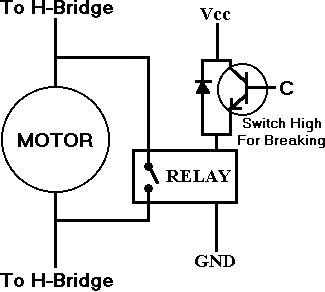
-        Electrically by shorting the motor coil terminals together, so the internal energy stored in the coil is dissipated, this method is easier to implement and decreases time to bring the motor to a complete stop. It can be implemented just by placing a relay across the motor coil terminals and activate it when we need to stop the motor, figure 11 shows simple electrical brakes.

Figure 14: electrical braking system

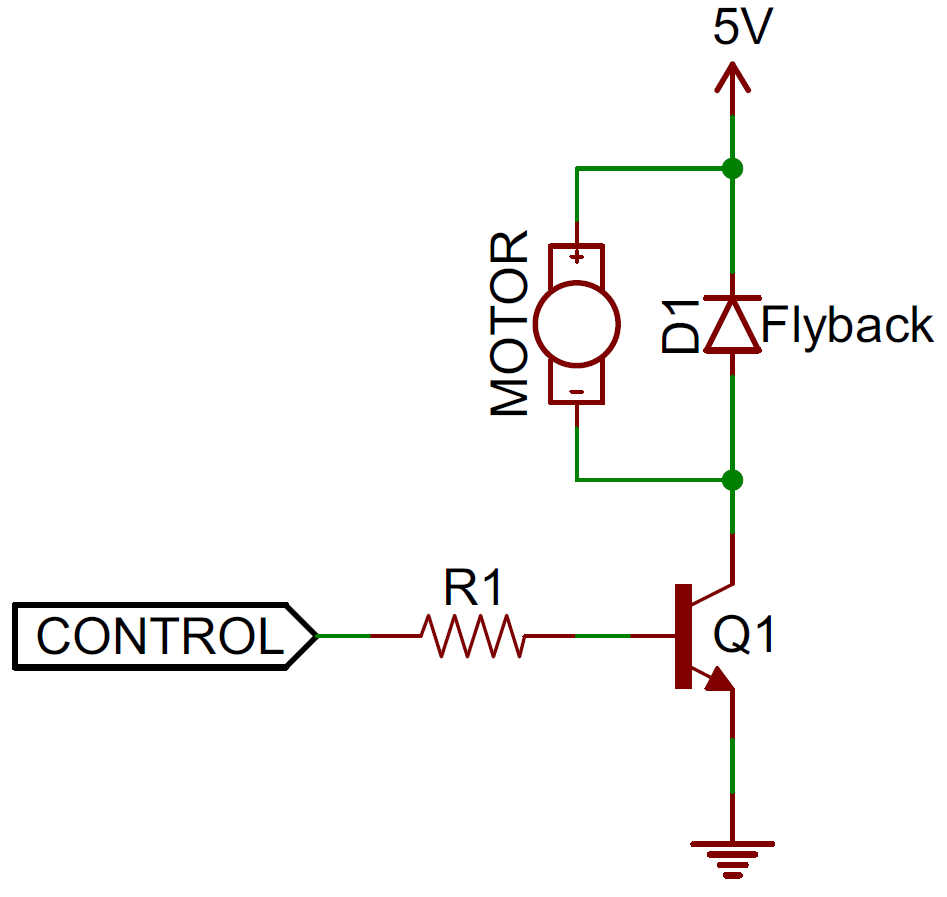
Another critical issue for coil-based electric actuators like motors, relays and solenoids is the “inductive kickback”, the internal coil of the actuator stores energy as long as it is supplied and operating, but once it is turned off the coil tries to dissipate all this stored energy in a form of a negative voltage spike that can be high enough to damage any sensitive electronic components like controllers, sensors, integrated circuits attached to the actuator control system, to protect the electronics from damage we connect a diode between the low-end of the actuator (the terminal connected to ground) and the power supply similar to the one in figure 12, this diode configuration is called “flyback diode”.

Figure 15: Flyback diode
Position sensing:
There two popular types of sensors used to sense the motor shaft position:
  •  Hall Effect sensors: they sense the magnetic field from the motor coil or from a magnetic or ferromagnetic material mounted on the motor shaft.
  • Optical encoders: basically they are optical sensors; internally they have a source of light, light sensor and a specially designed desk that blocks the light from reaching the sensor when it moves. The desk’s shaft is mounted to the motor’s shaft to sense the motor angular motion and output either an analog or digital code equivalent to the motor position. 
In part two of this article we will expand in explaining basic sensors and some advanced sensors for feedback, decision-making & control using microcontrollers, remote control via different wireless links and finally some mechanical design ideas for robotics, see you soon :)

Karim El-Rayes,
Vancouver, Canada
December 23, 2015